MIDI Configuration Overview
TL;DR: Presets bundle routing rules and user controls. Configuration auto-saves to JSON. Use the Login tab or ⋮ menu to access and backup your configuration file.
This document describes how configuration, presets, routing, and user-control dropdowns work within the application. It also explains how configuration is stored and how users can manage it through the interface.
Login Tab
The application uses a client–server model and auto-connects to a local port. Most users won’t need to adjust this, but in complex networks,*connection bookmarks simplify connecting to remote servers.
Modern operating systems support mDNS, so connecting to machine.local is usually straightforward.
All communication uses TCP websocket and not RTP MIDI UDP.
Each machine has its own configuration. To trigger a preset on a remote server, create a preset there that responds to a MIDI command, then send that command from a local User Control through a local virtual port routed to the remote destination.
Connected Inputs and Outputs
The configuration includes a list of all currently active MIDI ports.
These ports may be physical or virtual (where supported).
Presets
Presets store settings for both connected and disconnected ports. A preset may include:
- Routing definitions
- User control mappings (sliders, dropdowns, etc.)
Presets allow you to quickly restore a complete setup without manually reconfiguring each port.
Dropdowns
Dropdowns allow users to select values using friendly labels.
A label may also contain embedded MIDI commands, which override the default user-control behavior.
How Dropdowns Work
- Dropdown items are generated from the User Control definition
- A label may optionally include one or more embedded MIDI instructions
- When embedded commands are detected, the normal User Control action is skipped
- Instead, the embedded MIDI messages are sent immediately
See Supported Dropdown Embedded Commands for syntax.
Virtual Ports
Virtual MIDI ports can be used for internal routing.
⚠️ Limitations:
- Not supported on Windows however it is possible to create virtual ports using the modern Windows 11 MIDI 2.0 interface
- On macOS, virtual ports created outside Audio MIDI Setup may filter
sysexmessages
Persisting Configuration
Configuration is stored in a json file. Because the schema may change between versions, it is recommended to back up your configuration regularly.
Automatic Load/Save
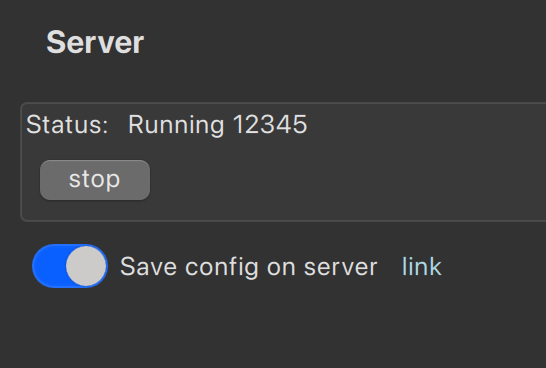
The Login tab allows you to:
- Load configuration when the application starts
- Save when the application closes
- Auto-save when changes are applied (with throttling)
Accessing the Configuration File
Clicking the link in the Login tab opens the server folder where the JSON configuration is stored.
You can copy this file for backup or migration.
Additional Options
The ⋮ (menu) button provides:
- About — Application information and version
- Download/Upload/Apply — Manage configuration across machines
- Accessibility — Adjust font size
- UI Preferences — Monitor settings
CLI Options (Advanced)
📌 Note: CLI available on macOS/Linux (included). Windows users: Install via
scoop install -g midi-router-client-cli
Useful for automation and headless deployments. For example:
./midi-router-client --apply --preset-name "main"
Since the application does not automatically re-apply when MIDI devices disconnect/reconnect, CLI preset application is handy for scripting.
See Advanced: CLI Reference for complete CLI documentation including headless mode and remote server control.
Screenshots
Figure 1: Settings Dialog
Access font sizes, UI preferences, and application settings.
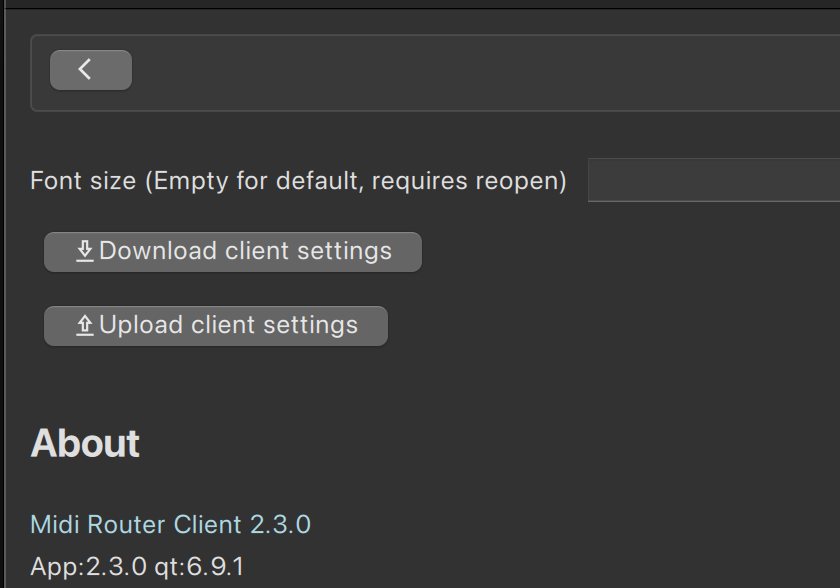
Figure 2: Login Tab
Load, save, and apply presets; access configuration files; manage remote server connections.
See Also
- Getting Started — Quick onboarding guide
- Presets — Manage preset activation modes
- Advanced: CLI Reference — Automation and remote control
- Glossary — MIDI terminology reference